Ip_invoice_tax_rates Table not updated

Hi,

Im using IP in Canada (QC state) - in french.
Ive set up my Taxes rates (2, but merge then into 1 tax - since multiple taxes doesnt work).

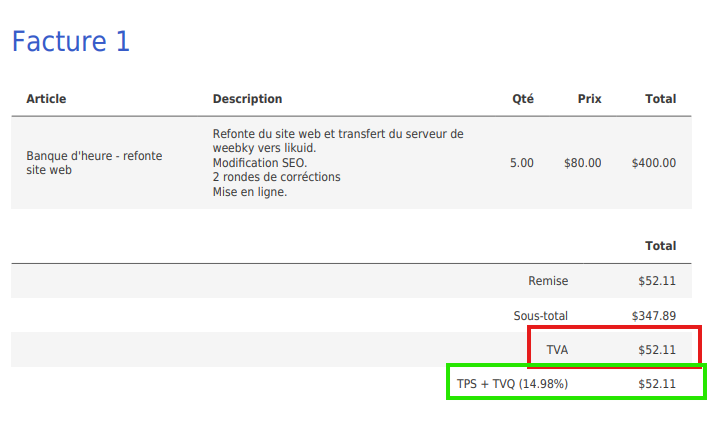
Now, when i create my pdf version, its still shows “TVA” instead of my custom taxes rates. (version : 1.7 of IP).
→ invoice with wrong name


→ Tax rate im using : Name : TVQ + TPS , rate 14.985%

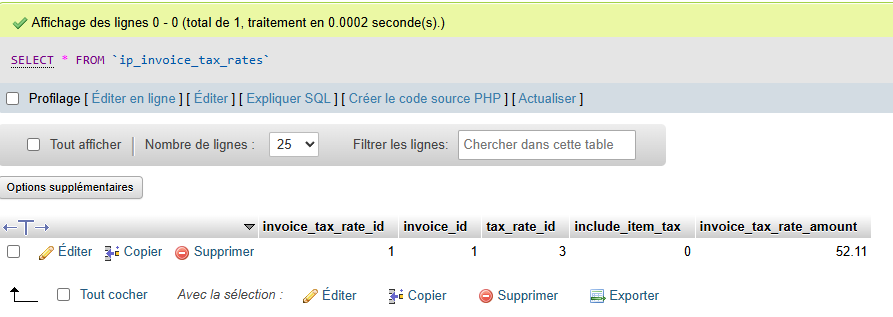
I’ve checked my phpmyadmin tables then, my “ip_invoice_tax_rates” table is empty.
If i manually insert infos (invoice tax rate id + tax rate id + invoice id) it works, but shows 2 lines in my pdf, Tva and my custom taxes rates…

Please Help!

Your invoice solution is amazing, thanks for your work!!!

Show how you’ve set up your tax rates inside InvoicePlane itself (screenshot is fine)
Show how you’ve selected the default tax rates in the settings (screenshot is fine)
Show how you’ve selected the tax rate on your invoice (screenshot is fine)

If you want to resolve multiple tax rates not working show the steps to reproduce.

If you want you can set it up on demo.invoiceplane.com

Show how you’ve tried to “merge” tax rates and then show “TVA” in your template (code is fine)

Open ipconfig.php. How many times do you see LEGACY_CALCULATION=

Show how you’ve set up your tax rates inside InvoicePlane itself :
Screenshot
image

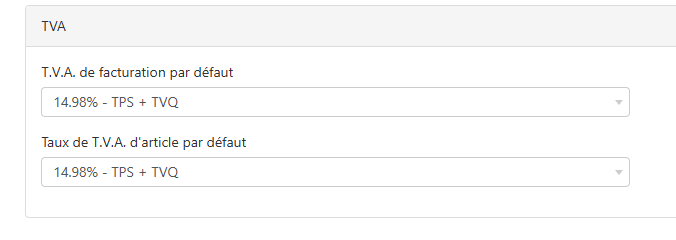
Show how you’ve selected the default tax rates in the settings :
Screenshot
image

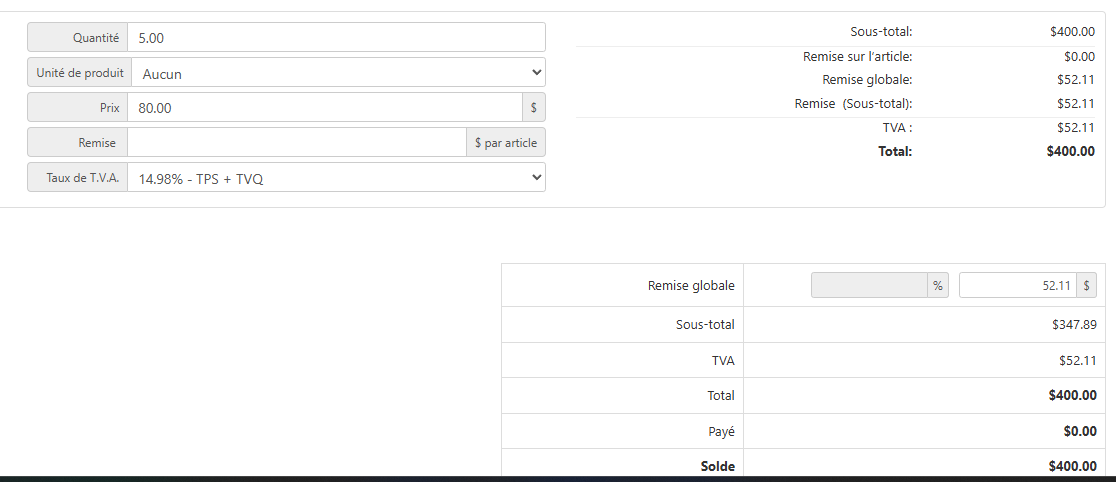
Show how you’ve selected the tax rate on your invoice :
Screenshot

If you want to resolve multiple tax rates not working show the steps to reproduce.
->I combined my 2 taxes rates

Show how you’ve tried to “merge” tax rates and then show “TVA” in your template
->I combined my 2 taxes rates directly in my taxes rates panel in admin - the “TPS + TVQ”

But, in example, ii i add a line manually in my sql table to test :


Then i get the right taxe name in my pdf (green square) but got also “tva” rates displayed too (red square) - Im leaving in quebec so “TVA” is not a terms to use.
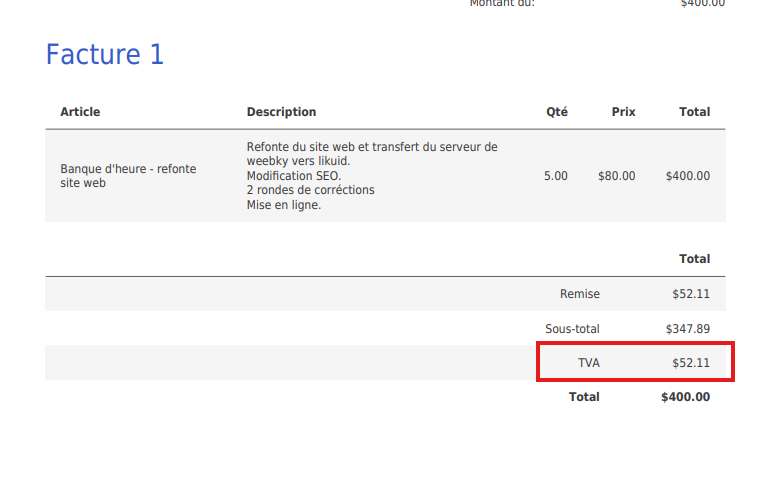
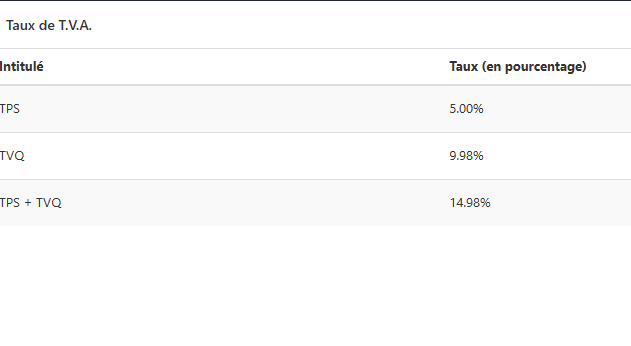
What i wish : display the correct taxe name in my pdf, the one ive setted in my taxe rate → “TPS + TVQ”, not TVA.

1 Like

I think that your tax rate of 52.11 does not automatically get saved into the database and you need to focus on that.

Focus on application/modules/invoices/views
Focus on what i asked you about that entry in ipconfig.php

And focus on things like this:

    public function save($id = null, $db_array = null)
    {
        // Only appliable in legacy calculation - since 1.6.3
        config_item('legacy_calculation') && parent::save($id, $db_array);

        $this->load->model('invoices/mdl_invoice_amounts');

        $invoice_id = $db_array['invoice_id'] ?? $this->input->post('invoice_id');

        if ($invoice_id) {
            $global_discount['item'] = $this->mdl_invoice_amounts->get_global_discount($invoice_id);
            // Recalculate invoice amounts
            $this->mdl_invoice_amounts->calculate($invoice_id, $global_discount);
        }
    }

That’s in the Tax Rates model in the Invoices module

And focus on this:

LEGACY_CALCULATION=

In your ipconfig.php

Ive, figured it out , using this : [BUG] Tax isn't auto-applied on the invoices - #13 by UnderDog

Kind of not a top UX but maybe it’ll Help other.

1.Config file v 1.7
Set “LEGACY_CALCULATION=true” in ipconfig.php (comment or delete the second one in the bottom of file).

2.Taxes clear (just in case)

~Delete all taxes and add a new fresh one~ (in my case “TPS+TVQ” at “14.98%”.

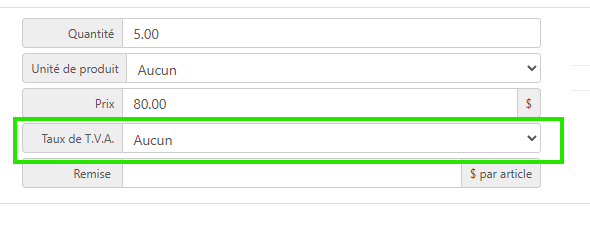
3.On my Invoice
->Set “Taux de TVA” to “aucun” or “none”
image
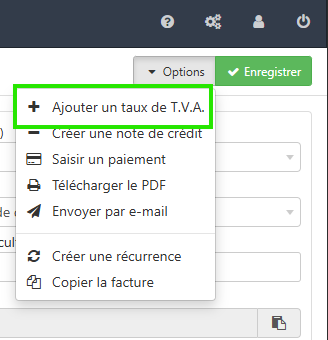
->Manually add my tax in top right option
image
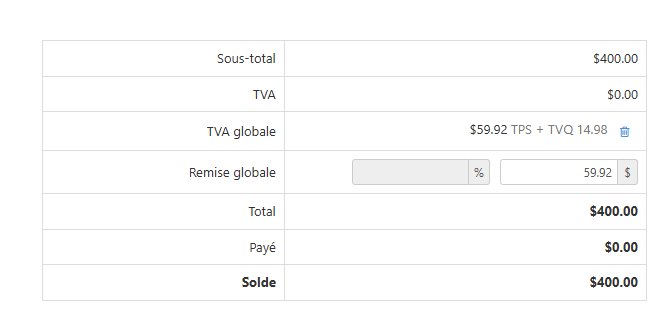
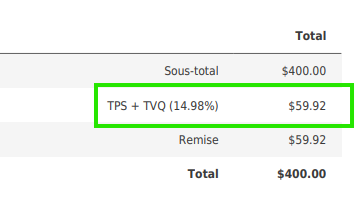
Here is results :
image
image

So, each futur invoices i’ll create, i got to set up manually my custom taxes. I dont know if its supposed to work like that ?

Tricky but its works BTW.

Thanks!

1 Like

I’m sorry, but rest of the world: please don’t do that.

@Steeve_Bedelson now your old invoices which did have those old tax rates that you just deleted don’t have tax rate any more

Just: don’t

It’s purely that your ipconfig.php had that config variable twice and you had to set it correctly, that’s all.

Your steps were great, by the way.
Good for documentation PR: https://github.com/InvoicePlane/invoiceplane.com/pulls

Yes you got right, dont delete tax rate if its already in use.

No problem on my side (juste one invoice).

Thanks for the adive, and again great tool!

1 Like