Reduce "row" sizes

Hello, I just went to v1.6.3 , thanks for your continued development.
When possible I’d like to put everything on one page, here’s what I’ve tried so far.
I’ve removed some things from InvoicePlane.php that I don’t think I’ll use, and removed some line breaks , ie. br that got me some real estate back, and I’ve made entries to templates.css and custom-pdf.css , the changes definitely help for reducing text size but not in the item paragraphs.
I put this into each of the two mentioned files, any advice would be appreciated.

body {
font-size: 10px;
line-height: 1.0;
margin: 5px;
padding: 5px;
}

1 Like

It’s exactly the right approach

Personally, i would have renamed InvoicePlane.php to InvoicePlane custom.php and then set that in all the settings.

  • Let’s say version 1.6.4 gets released.
  • It will definitely have some changes in InvoicePlane.php
  • Then you don’t want your beautiful changes be overwritten.

That’s true, I’ll clean things up once I get the right format.
But what can I do in the meantime to reduce the padding/spacing of the items the invoice, because what I have doesn’t affect those things. It does affect the footer/header and rest of the text.

1 Like

Show the screenshot of all the things that you want to reduce padding on.

I would have taken a screenshot, pasted it in paint and just started drawing.

The lazy way:
<table cellpadding="0" cellspacing="0">, but that is sooooo 1996…

I would still focus on that css that you showed.

  • Is that css actually used?
  • does background-color:red actually turn a table cell red?
body {
font-size: 10px;
line-height: 1.0;
margin: 5px;
padding: 5px;
}

I would not target “body”
I would target table and tr and td instead.
If your style actually turns the table cell (td) red, style it like you want.

I still think you can get rid of padding and spacing in other places.

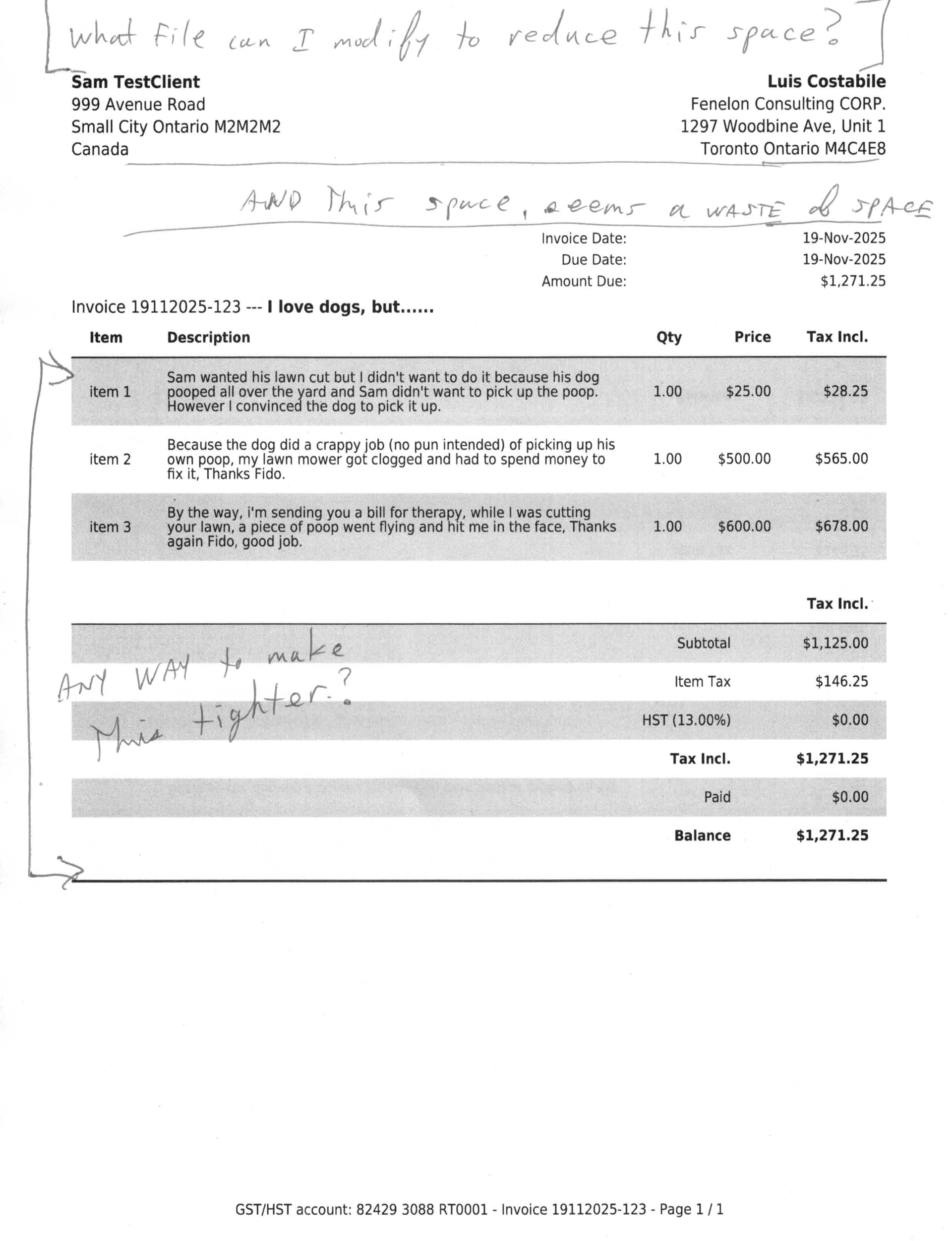
Thanks Underdog, that helps, this is what I have now and has improved things. I’m including some of the other things I’ve done in hopes it helps someone out. Go easy on me, I don’t have a software background and I have to struggle with some of this stuff. Also, please see attached where I made notes of other possible areas that can be compacted.

1). vi custom-pdf.css

table {
  font-size: 8px;
  line-height: 1.0;
  margin: 4px;
  padding: 5px;
}

2). To reduce amount of white space at the top of the invoice

vi InvoicePlane.php
Comment out or remove logo handling, I don’t have a logo so I don’t need it.
It would be more elegant to check for existance of logo, if none, don’t do anything,
If I remove these 3 lines it pushes everything up and makes more room for useful stuff.

50     <div id="logo">
51         <?php echo invoice_logo_pdf(); ?>
52     </div>

3). The line with Invoice number, I removed h1, also this is where I added a custom field jobdescription so it shows up beside the invoice number, you still have to add the field from settings → custom fields

Line 174 in InvoicePlane.php

<class="invoice-title <?php echo $text_class ?>"><?php _trans('invoice') ?> <?php _htmlsc($invoice->invoice_number) ?> --- <b><?php  echo $custom_fields['invoice']['jobdescription']?> </b>

4) I saw somewhere the footer is not handled properly in v1.6.3 and will be fixed in 1.6.4, so for now hard coded my info, and added some line breaks to push the footer up so it fits in the first page.

<htmlpagefooter name="footer">
    <footer>
        GST/HST account: ....... -  <?php _trans('invoice'); ?> <?php echo $invoice->invoice_number; ?> - <?php _trans('page'); ?> {PAGENO} / {nbpg}
        <br>
        <br>
        <br>
        <br>
        <br>
    </footer>
</htmlpagefooter>

The END.

1 Like

First of all: your Invoice layout looks amazing. Please share it.

Check my message

Second: You are in luck.

Now…

<main>

    <div class="invoice-details clearfix">
        <table class="large">

See those?
Those are lines 142 - 145

You can style those elements

First, i would look for this file:
assets/core/scss/_templates.scss

Now style everything you like and since you like minimal spacing, i would style the main element as well

Since it’s a .scss file, you need to run yarn grunt again, so the css gets compiled

Or you can style it in custom-pdf.css

<header class="clearfix">

    <div id="logo">
        <?php echo invoice_logo_pdf(); ?>
    </div>

^^^ that is line 48-52
Your empty div (since you don’t have a logo) is taking up some space

Make it:

<?php
if (invoice_logo_pdf()) {
?>
    <div id="logo">
        <?php echo invoice_logo_pdf(); ?>
    </div>
<?php
}
?>

It will only show the div if you have a logo.

Now, style that header element and you’ve won some more spacing

That’s great, thank you very much, I’ll play with those .
And thanks for the complement on my invoice layout, but I don’t know what file to share with you, let me know and I’ll gladly share.

1 Like

I don’t know what file to share with you, let me know and I’ll gladly share

If you cab share the file that you’re editing. Most likely application/views/invoice_templates/pdf/InvoicePlane.php or maybe even application/views/invoice_templates/pdf/InvoicePlane custom.php that would be awesome.

I’ll remove the hard-coded stuff from the footer, no problem

Sure, Here’s my InvoicePlane.php

custom-pdf.css

table {
  font-size: 8px;
  line-height: 1.0;
  margin: 4px;
  padding: 5px;
}
/application/language/english

vi ip_lang.php

636     'total' => 'Total',

Changed to…

636     'total' => 'Tax Incl.',
1 Like

I love that you used vi to edit ip_lang.php how did you get out of vi? (programmer’s joke)

Good One.
I’m an old fart, and back in the day we only had dumb terminals connected to the serial port of servers, so the only thing we could use in single user mode was vi, plus it’s guaranteed to be on every system.
1 Like